
With weekly cyber attacks rising by 17% in 2026 to an average of 2,090 incidents, your digital safety is no longer a secondary concern. Ensuring data security in short-stay Wi-Fi is now as fundamental to a luxury experience as a seamless check-in or a curated welcome hamper. You deserve the confidence that your sensitive information remains protected with the same rigor as your physical suite.
We recognize that the threat of identity theft on unfamiliar networks is a valid worry, particularly when technical jargon makes protection feel out of reach. You shouldn't have to compromise on connection speed to stay safe. This guide provides a clear protocol for maintaining a sophisticated digital perimeter while enjoying the high-end amenities of your accommodation. We will outline the exact questions to ask your host before arrival and the 2026 standards that ensure your digital home is as secure as your physical one.
Key Takeaways
- Identify and mitigate sophisticated digital threats, such as 'Man-in-the-Middle' attacks, to protect your personal information on temporary residential networks.
- Learn why WPA3 encryption and AP isolation are the essential modern benchmarks for ensuring data security in short-stay Wi-Fi.
- Implement a practical device audit to manage auto-connect settings and avoid falling victim to malicious 'trap' hotspots.
- Establish a reliable verification protocol with your host to ensure the network you join is legitimate, private, and secure.
- Gain insight into how elite accommodations like Douglas Luxury Apartments use professional IT monitoring to safeguard your digital privacy.
Understanding the Risks of Unsecured Short-Stay Networks
Ensuring data security in short-stay Wi-Fi is about more than just a strong password. It's the comprehensive protection of your digital identity within a temporary residential network. While you enjoy the elegance of a premium suite, your data often travels through hardware that serves a rotating cast of guests. This high turnover creates unique risks that differ significantly from your static home connection. Understanding the evolution of Wi-Fi security standards is the first step in identifying these risks and protecting your assets.
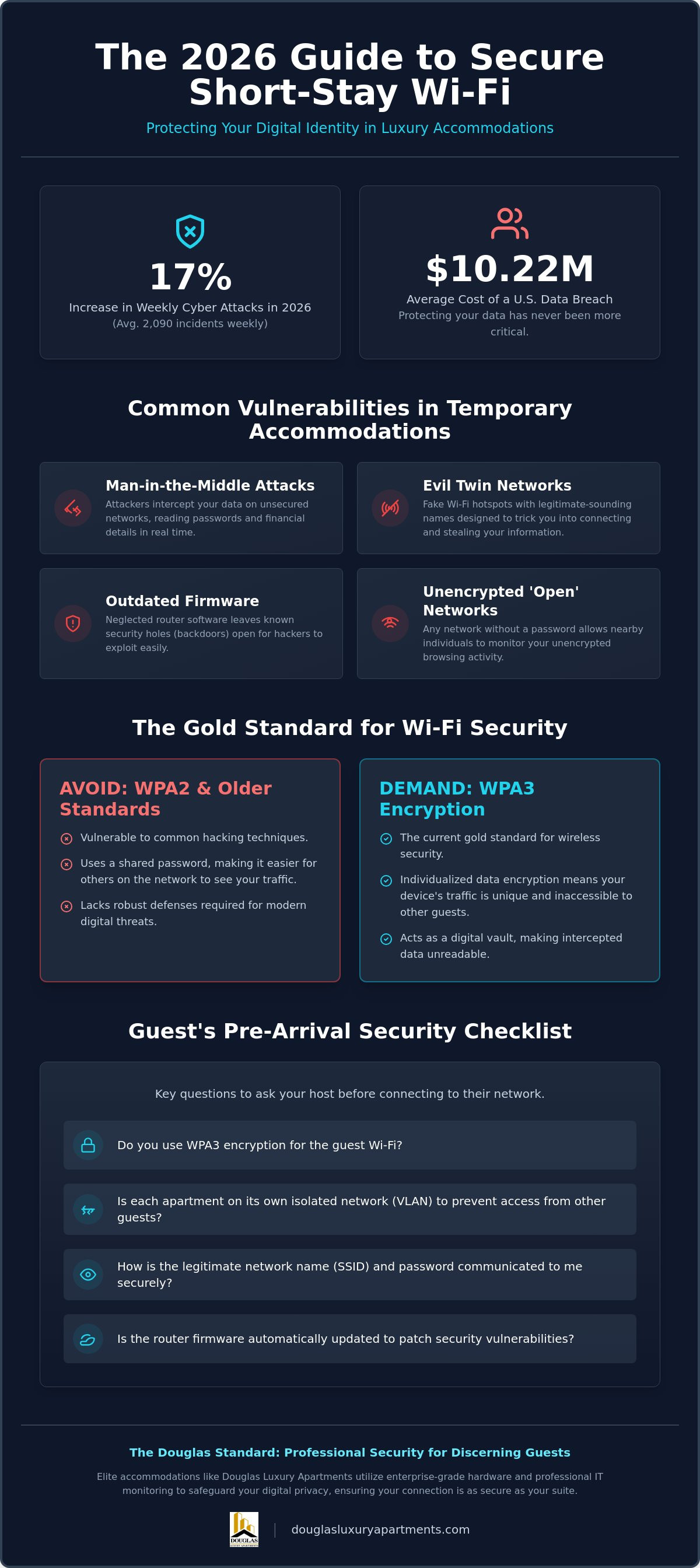
A common threat is the 'Man-in-the-Middle' attack. Think of it as a hidden digital courier who intercepts your data before it reaches the router. They can read your passwords or bank details in real time, then pass the information along so the connection feels normal. For the discerning traveller, this invisibility is the greatest danger. Sophisticated attackers prioritize high-end guests because they often carry corporate secrets or manage substantial portfolios. In 2026, with the average cost of a U.S. data breach reaching $10.22 million, the stakes for your digital privacy have never been higher.
There's a vast difference between the 'open' networks of a local cafe and the infrastructure of a professional serviced apartment. In a public space, your data is essentially broadcast to anyone nearby. A premium short-stay should offer a controlled environment, yet many still fall short of enterprise-grade safety. Ensuring data security in short-stay Wi-Fi requires a host who treats cybersecurity with the same level of care as their physical housekeeping.
Why Short-Stay Security Differs from Home Wi-Fi
Home networks benefit from consistency. In contrast, short-stay environments face constant guest turnover, which often leads to 'password fatigue' where security credentials aren't updated for months. Multi-unit buildings also frequently use shared hardware that can expose your device to others in the same complex. Network isolation is a critical protection feature that prevents guests on the same Wi-Fi from seeing or accessing each other's devices.
Common Vulnerabilities in Temporary Accommodations
- Outdated Firmware: Many hosts forget to update router software, leaving known backdoors open to hackers.
- Evil Twin Networks: Attackers set up fake hotspots with names that mimic the host's network to trick you into connecting.
- Unencrypted 'Open' Networks: Any network that doesn't require a password allows anyone within range to monitor your unencrypted browsing history.
With a 17% increase in weekly cyber attacks this year, these vulnerabilities are no longer theoretical. You must verify that your chosen accommodation prioritizes modern encryption over convenience.
Technical Standards: What Makes a Wi-Fi Connection Secure?
A premium stay requires more than just high-speed connectivity. It demands an infrastructure designed to withstand modern digital threats. While basic consumer routers are common in standard rentals, elite accommodations utilize enterprise-grade hardware to maintain a superior level of protection. Ensuring data security in short-stay Wi-Fi depends heavily on these underlying technical standards, which transform a simple internet connection into a fortified private network.
Professional management companies prioritize hardware that supports automated firmware updates. This is vital for patching zero-day vulnerabilities before they can be exploited. Unlike home routers that may sit unpatched for years, enterprise systems are monitored by professional IT staff who ensure every access point remains current. For a detailed look at consumer-level precautions, the FTC guide to public Wi-Fi safety provides a helpful baseline for any traveller.
The Shift to WPA3 and Advanced Encryption
WPA3 is the current gold standard for wireless security. It offers significant improvements over WPA2, most notably through individualized data encryption. This means that even if multiple guests use the same network password, the data sent from your specific device remains unique and inaccessible to others. You should be wary of any network still relying on WPA2 or the obsolete WEP standard, as these lack the robust defenses required in 2026. Advanced encryption acts as a digital vault for your outgoing traffic, ensuring that even if data is intercepted, it remains unreadable to unauthorized parties.
Dedicated Guest Networks and VLANs
In a luxury apartment, your connection should feel as private as your living room. This is achieved through a Virtual Local Area Network (VLAN). A VLAN creates a private, isolated digital environment for each suite, effectively partitioning your connection from other guests in the building. This setup prevents 'lateral movement,' a technique where hackers jump from one device to another on a shared network.
- AP Isolation: This feature ensures that your laptop cannot 'see' or communicate with a stranger's tablet in the next room.
- Time-Bound Credentials: Professional hosts often provide unique login details that expire upon your checkout, preventing unauthorized long-term access.
- Network Monitoring: Enterprise systems allow for real-time threat detection without compromising guest privacy.
When you choose a refined Two Bedroom Luxury Apartment, you are investing in a space where technical excellence is a standard amenity. This commitment to sophisticated infrastructure ensures that your digital 'home' is as secure as your physical one.
A Guest’s Checklist for Securing Personal Data on the Go
While a premium host provides the fortified infrastructure, the final layer of protection rests in your hands. Ensuring data security in short-stay Wi-Fi is a collaborative effort between a sophisticated provider and a vigilant guest. Before you even cross the threshold of your suite, your digital preparation should begin. Start by updating your operating system and all security software while still on a known, trusted network. These updates often contain critical patches for vulnerabilities that hackers exploit in high-traffic residential areas.
Once you arrive, do not simply connect to the strongest signal available. Verify the exact network name and password provided in your official welcome pack. This simple step prevents you from accidentally joining an 'Evil Twin' network designed to mimic the host's credentials. Additionally, ensure that Two-Factor Authentication (2FA) is active on all sensitive accounts. In the unlikely event that a password is intercepted, 2FA acts as a secondary shield that keeps your most private information out of reach.
Essential Device Settings Before You Connect
Your device is often set to be 'helpful' in ways that compromise your privacy. Before connecting, turn off 'File Sharing' and 'Network Discovery' in your system settings. These features are excellent for a home office but expose your files to others on a shared apartment network. Modern smartphones also offer 'Private Wi-Fi Address' or MAC randomization; keep this enabled to prevent trackers from identifying your device across different locations. Finally, make it a habit to 'Forget Network' immediately after checking out. This prevents your device from automatically searching for and connecting to stale signals in the future.
Using VPNs and Secure Browsing Protocols
A reputable Virtual Private Network (VPN) is an essential tool for the modern professional. By creating an encrypted tunnel for your data, a VPN ensures that your traffic remains private even if the underlying network has a vulnerability. For business travellers, a paid VPN service is always superior to free versions. Free providers often monetize your browsing data, which defeats the purpose of the tool. Always look for the 'HTTPS' padlock in your browser bar to ensure your session is encrypted from end to end.
By following these protocols, you can enjoy the peace of mind that comes with a truly secure digital environment. If you value a stay where these security standards are already integrated into the experience, we invite you to reserve your Three Bedroom Luxury Apartment today. Our commitment to your safety extends from our physical concierge to our digital architecture.
The Douglas Standard: Professional Security for Discerning Guests
At Douglas Luxury Apartments, we believe your digital safety is a non-negotiable aspect of high-end hospitality. While generic travel advice often warns against the inherent risks of public networks, we provide a proactive alternative. Ensuring data security in short-stay Wi-Fi is a core pillar of our "secure, clean, and comfortable" brand promise. We treat your connection as a private, high-speed extension of your office, allowing you to conduct banking, corporate communications, and personal browsing with absolute confidence.
Our commitment involves rigorous enterprise-grade cybersecurity protocols. Unlike standard rentals that rely on basic consumer hardware, our infrastructure undergoes regular hardware audits and continuous network monitoring by professional IT staff. This ensures every access point is optimized for both speed and safety. We don't just provide a password; we provide a managed digital environment that adapts to emerging 2026 threats before they can reach your device.
How Premium Providers Protect Guest Privacy
Privacy is the ultimate luxury. We implement unique SSID and password protocols for our two bedroom luxury apartments, ensuring your data remains isolated within your specific suite. This level of detail is especially critical for residents in our extended stay accommodation, where long-term digital habits require robust, persistent firewall protection. We pair high-speed, unlimited bandwidth with sophisticated encryption so your productivity is never hampered by security-related latency.
Booking Your Secure Stay with Confidence
When browsing our listings, you can identify our specific security features as standard amenities. We offer the peace of mind that comes with attentive, 24/7 customer service for any technical support you might require. Our team is trained to handle your connectivity needs with the same elegance and efficiency we bring to our physical concierge services. If you're ready to experience a stay where your digital "home" is as fortified as your physical one, secure your next luxury stay with us today. Your privacy is our priority.
Elevating Your Digital Standards for 2026
Maintaining a secure digital perimeter is no longer optional for the modern professional. You've now gained the essential knowledge to distinguish between basic connectivity and a truly fortified environment. By prioritizing WPA3 encryption and implementing a personal protocol of VPN usage and two-factor authentication, you'll travel with absolute confidence. Ensuring data security in short-stay Wi-Fi is a hallmark of professional hospitality that separates global industry leaders from standard residential rentals.
At Douglas Luxury Apartments, we integrate these technical safeguards into the very architecture of our suites. Our enterprise-grade network security and attentive 24/7 customer support are why we're a trusted choice for international business professionals who value discretion. We invite you to experience a stay where your digital privacy is treated with the same level of prestige as your physical comfort. Book your secure luxury stay at Douglas Luxury Apartments today and enjoy the sophisticated peace of mind you deserve. Your safety is our commitment to excellence.
Frequently Asked Questions
Is it safe to do online banking on a short-stay apartment's Wi-Fi?
It is safe to conduct online banking if you are certain the network uses modern, enterprise-grade encryption like WPA3. However, we recommend always enabling a reputable VPN as an additional layer of protection for high-stakes financial transactions. This creates a private tunnel that shields your credentials from potential interceptors. Ensuring data security in short-stay Wi-Fi means never relying solely on the host's settings for your most sensitive accounts.
Should I use a VPN every time I connect to a rental's network?
You should use a VPN every time you connect to a temporary network to ensure your traffic remains completely private. Even in premium accommodations, a VPN mitigates risks from other connected devices that might be on the same hardware. It effectively masks your IP address and encrypts your entire data flow. This habit is a standard protocol for international business professionals who value digital discretion and professional standards.
What should I do if the Wi-Fi network doesn't require a password?
You should avoid connecting to any network that does not require a password, as these open connections are often unencrypted and vulnerable. If a password is not provided in your welcome pack, contact your host immediately to verify the correct secure network. Open networks are prime locations for malicious hotspots. If you must connect in an emergency, ensure your VPN is active before any data is transmitted.
Can the host see my browsing history when I use their Wi-Fi?
A host cannot see the specific content of your encrypted traffic, but they can technically see the domains you visit through standard router logs. Using a VPN or ensuring you only visit HTTPS sites prevents this level of visibility. Professional management companies prioritize guest privacy and do not monitor individual browsing habits. Their focus remains on maintaining network health and performance rather than data collection.
How can I tell if a Wi-Fi network is using WPA3 encryption?
You can verify the encryption standard by checking the "Network Properties" or "Security" tab in your device's Wi-Fi settings after connecting. Look for the label "WPA3-Personal" or "WPA3-Enterprise" next to the network name. Ensuring data security in short-stay Wi-Fi involves confirming these modern standards are active. If your device only shows WPA2, the network is using an older protocol that lacks the latest individualized encryption features.
What are the signs that my device might have been compromised on a public network?
Signs of a compromised device include sudden battery drain, unexpected pop-up windows, or a noticeable decrease in connection speed. You might also notice your accounts being accessed from unfamiliar locations or apps opening on their own. If you suspect a breach, disconnect from the network immediately and run a comprehensive security scan. Resetting your passwords from a trusted mobile data connection is a necessary and urgent next step.